 Akash Sathvara
File Handling
Opening/Making a File
The fopen() function is used to open files in PHP.
<?php


$file=fopen("demo.txt","w");


fwrite($file,'Akash');


fwrite($file,'Sathvara');


fclose($file);


?>
In ‘demo.txt’ file the data will be,
Note:
- When you want to write in a file, then it should not be in read mode.
- Octal value for permissions –> read-444, write-222, execute-111, read/write/execute-777
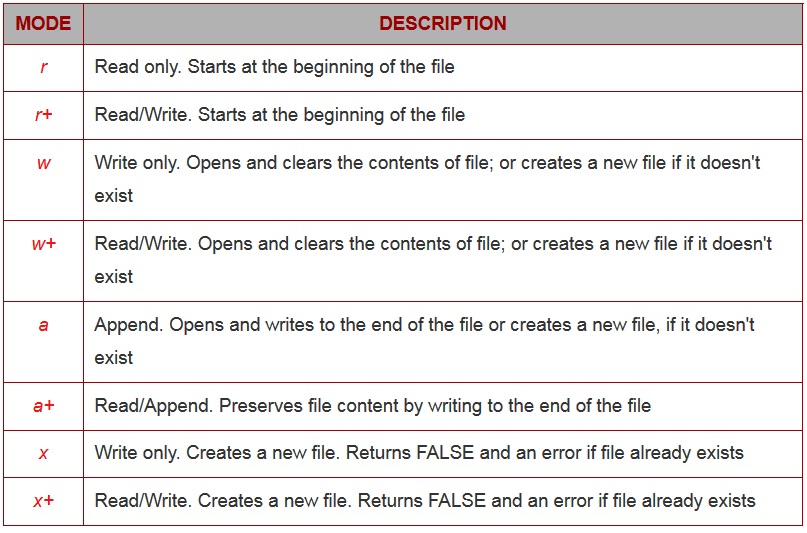
A list of possible modes for fopen() :
Writing in File
If you want to add a new data in the old file then you have to use ‘a’ (append) mode.
<?php


$filename = 'test.txt';


$somecontent = "Akash Sathvara\n";


//if mode 'a', then everytime new contents will be written.


//but when mode is 'w', then the contents will be added and


//will not delete the old data.


fopen($filename,'a');


//is_writable() will check the file is writable or not


if (is_writable($filename)) {


    if (!$handle = fopen($filename, 'a')) {


         echo "Cannot open file ($filename)";


         exit;


    }


    //fwrite() and fputs() is used to write in a file


    if (fwrite($handle, $somecontent) === FALSE) {


        echo "Cannot write to file ($filename)";


        exit;


    }


    echo "Success, wrote ( $somecontent) to file ($filename)";


    //fclose() is used to close the file


    fclose($handle);


} else {


    echo "The file $filename is not writable";


}


//unlink() will deletes the file


//unlink($filename);


echo "<pre>";


//file() will read a file into an array


print_r(file($filename));


?>
In ‘test.txt’ file the data will be,
Akash Sathvara
Reading a File
If you want to read a file(demo.txt) line by line, you have to use fgets() or fread().
<?php


unset($file1);


error_reporting();


$file1 = fopen("file_function/demo.txt", "r") or exit("Unable to open file!");
//feof() check the file until the end is reached


while(!feof($file1))


  {


    //fgets() will read a file line by line


    echo fgets($file1)."<br>";


  }


fclose($file1);
?>
Ouput :
If you want to read a file(demo.txt) character by character, you have to use fgetc().
<?php
$file = fopen("file_function/demo.txt", "r") or exit("Unable to open file!");


//feof() check the file until the end is reached


while(!feof($file))


  {


    //fgetc() will read a file character by character


    echo fgetc($file)."<br>";


  }


fclose($file);
?>
Ouput :
Making a CSV File
If you want to make a .csv file(csvfile.csv), you have to use fputcsv().
<?php


$list = array(


    array('hitesh','sunny','nirav','hemraj'),


    array('gandhinagar','ahmedabad','rajkot'),


    array('"batch1"','"batch2"')


);


$fp = fopen('file_function/csvfile.csv','w');


foreach($list as $fields) {


    fputcsv($fp, $fields);


}


fclose($fp);


?>
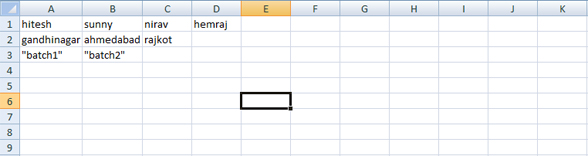
In ‘csvfile.csv’ file the data will be,
Reading a CSV File
If you want to read a .csv file(csvfile.csv), you have to use fgetcsv().
<?php


$row=1;


if (($handle = fopen("file_function/csvfile.csv","r")) !== FALSE) {


    while (($data = fgetcsv($handle, 1000, ",")) !== FALSE) {


        $num = count($data);


        echo "$num fields in line $row: <br />=================<br />";


        $row++;


        for ($c=0; $c < $num; $c++)    {


            echo $data[$c] . "<br />\n";


        }


        echo "<br />";


    }


    fclose($handle);


}


?>
Output :
 learn2php